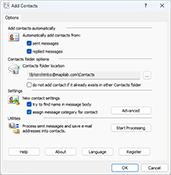
Add Contacts is an add-on for Microsoft Outlook that automatically adds e-mail addresses to the contact folder when you reply to a message and/or send a new message.
This add-on for Microsoft Outlook will help you to avoid losing addresses of people you correspond with. Moreover, the collected addresses can be used for mail filtering. For example, you can use the Rule Wizard to have messages from certain senders (whose addresses are there in the address book) placed in a separate folder to ensure that their message will be dealt with greater priority and no important messages will be lost with deleted spam. Some spam filters also check the contact folder to rule out erratic responses to recognised senders.
When a contact is being created, this add-on for Outlook attempts to detect the name corresponding to the e-mail address automatically. So, if you have received a message from the address "John Smith" [email protected], the new contact created by the program will be named John Smith. However, if name detection fails, add-on for Outlook attempts to retrieve it from the message body itself. For example, if your message begins with the words "Dear John,", the program will automatically extract the name from the greeting and create a contact named John. You can disable automatic name detection in the add-on for Outlook settings.
You can also enable the option of category assigning to created contacts. If a category is assigned to a message while sending, the same
category will be assigned to the created contact.
You can choose any folder as the contact destination, either in your personal mailbox or in public folders on Microsoft Exchange server. When adding a contact, Add Contacts checks the folder for possible duplicates. In the program settings, you can also instruct this outlook add on to search for contact duplicates throughout all contact folders in your personal mailbox besides the specific destination folder.
Thank you very much for your "Add Contacts" Add-in. As a freelancer, it helps me enormously to include all my business partners in my address book saving me lots of time to identify my contacts.
How to create a mailing list from existing messages in Outlook Puzzled by your Outlook not adding existing senders and recipients to the list of Contacts? The bad news is that it’s not supposed to. The good news is that it can be fixed with the help of Add Contacts add-in for Outlook...
Add Contacts is an add-on for Microsoft Outlook that automatically adds e-mail addresses to the contact folder when you reply to a message and/or send a new message.
This add-on for Microsoft Outlook will help you to avoid losing addresses of people you correspond with. Moreover, the collected addresses can be used for mail filtering. For example, you can use the Rule Wizard to have messages from certain senders (whose addresses are there in the address book) placed in a separate folder to ensure that their message will be dealt with greater priority and no important messages will be lost with deleted spam. Some spam filters also check the contact folder to rule out erratic responses to recognized senders.
When a contact is being created, this add-on for Outlook attempts to detect the name corresponding to the e-mail address automatically. So, if you have received a message from the address "John Smith" [email protected], the new contact created by the program will be named John Smith. However, if name detection fails, add-on for Outlook attempts to retrieve it from the message body itself. For example, if your message begins with the words "Dear John,", the program will automatically extract the name from the greeting and create a contact named John. You can disable automatic name detection in the add-on for Outlook settings.
You can also enable the option of category assigning to created contacts. If acategory is assigned to a message while sending, the same category will be assigned to the created contact.
Add Contacts for Outlook is fully compatible with:
Microsoft Outlook 2016, 2013, 2010, 2007, 2003, 2002/XP;
Outlook for Microsoft 365/Office 365 in Windows;
Microsoft Windows 11, 8, 7, Vista, 2003, XP.
You can choose any folder as the contact destination, either in your personal mailbox or in public folders on Microsoft Exchange server. When adding a contact, Add Contacts checks the folder for possible duplicates. In the program settings, you can also instruct this outlook add on to search for contact duplicates throughout all contact folders in your personal mailbox besides the specific destination folder.
Please note that the similar automatic contact adding feature was available with Microsoft Outlook 2000 in the IMO mode (Internet Mail), but further Microsoft Outlook versions don't have it. To check if this option is available with your version of Outlook, select the Options item in the Tools menu, switch to the tab Preferences and click the Email Options button. If you are using Microsoft Outlook 2000 you will see the option "Automatically put people I reply to in" at the bottom of the dialogue.
Program Features:
Add Contacts works in automatic mode
Search email adresses in selected Outlook folders
Find a name of contacts in the message body
Assign acategory to the processed contacts
Prevent duplicate contacts
Supports English and German interface languages
Technical support
The license grants you a right to get new versions and technical support for free during one year.
After one year you can continue use installed version of the product without any limitations but if you would like to get technical support or to download new version of the product the license renew is required.
To get a status of your license and to renew it please follow the Renew license area on the web-site.
Technical support is provided via e-mail and Tickets system on the web-site.
Download Trial Version
You can download free trial version (5228 KB) of Add Contacts and test it before purchasing:
Trial version of Add Contacts has no limitations. But if you would like to use this software after the 30 days evaluation period a registration is required. You can order the fully licensed version of Add Contacts over the Internet with any major credit card.
Pricing:
License type
USD
Single user license
19
5-Users license
70
10-Users license
120
25-Users license
280
50-Users license
500
100-Users license
750
* If you are interested in purchasing more than 100 users licenses, volume prices are available here.
Thank you very much for your "Add Contacts" Add-in. As a freelancer, it helps me enormously to include all my business partners in my address book saving me lots of time to identify my contacts.
How to create a mailing list from existing messages in Outlook Puzzled by your Outlook not adding existing senders and recipients to the list of Contacts? The bad news is that it’s not supposed to. The good news is that it can be fixed with the help of Add Contacts add-in for Outlook...
The Website uses cookies that allow us to recognize you and collect information about your user experience.
Permission to use cookies necessary for the use of the Site and its services, including ordering services. By visiting the site, we are sure that you consent to the use and storage of cookies on your device. If you agree, continue to use the site. If not – set special settings in your browser or contact technical support.



 Read more testimonials








 Primary Download