How to avoid security prompts in Visual Basic programs for Outlook
Introduction to MAPI
We are not going to attempt to give a description of the MAPI architecture or special situations about using it here (you can find this information from many other sources, including MSDN). We would rather focus on the practical methods of MAPI usage, as far as the subject of this article is concerned.
To explore MAPI features in practice, we will use a shareware add-in OutlookSpy available at dimastr.com. Install the add-in, and you get a wonderful opportunity to explore both the object model of Outlook and CDO.
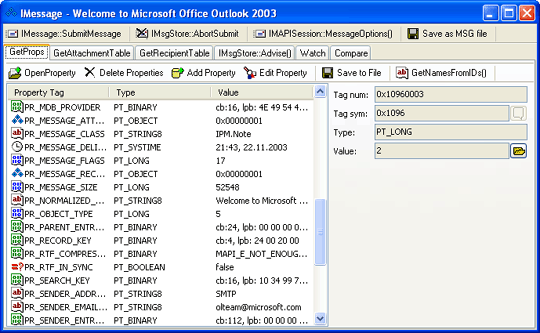
Open a message; click the CurrentItem button on the OutlookSpy toolbar, and you will see the _MailItem object representing the message in OOM. Find the MAPIOBJECT property, click it and then select the Browse button — and OutlookSpy will show you the IMessage interface of the corresponding MAPI object.
With the IMessage interface the following options are available:
| GetAttachmentTable |
Returns the message's attachment table. |
| OpenAttach |
Opens an attachment. |
| CreateAttach |
Creates a new attachment. |
| DeleteAttach |
Deletes an attachment. |
| GetRecipientTable |
Returns the message's recipient table. |
| ModifyRecipients |
Adds, deletes, or modifies message recipients. |
| SubmitMessage |
Saves all changes to the message and marks it as ready for sending. |
| SetReadFlag |
Sets or clears the MSGFLAG_READ flag in the PR_MESSAGE_FLAGS property of the message and manages the sending of read reports. |
|
Actually, a message is presented to us in MAPI as a table of attachments, a table of recipients, and a set of properties. The list of
the object properties can be obtained by invoking IMAPIProp::GetPropList, and the properties themselves through IMAPIProp::GetProps. What we see on the "GetProps" tab of the
OutlookSpy is the outcome of the two function performance.
Let's take a closer look at the PR_SENDER_EMAIL_ADDRESS property which has already been mentioned above. Tag PR_SENDER_EMAIL_ADDRESS corresponds to the hexadecimal
&H0C1F001E, where the lower part &H001E is the type of property PT_STRING8, which is a standard ANSI-string. Visual Studio is supplied with files MAPIDEFS.H and MAPITAGS.H, the first containing property type declarations, and the second containing declarations of the properties themselves. The two files are also available in Microsoft Platform SDK.
However, some features cannot be accessed through invoking IMAPIProp::GetProps. Values of such properties as PR_BODY (message body) may be rather significant, so upon invocation of the function error code MAPI_E_NOT_ENOUGH_MEMORY it will be returned. To get values of such properties, the IMAPIProp::OpenProperty method, which opens the property as a stream (IStream), is used.
Besides, there are some properties that contain values in compressed form, e.g., PR_RTF_COMPRESSED, which contains compressed message body in the RTF format. When such property is being read with IMAPIProp::OpenProperty, the value will be loaded "as is". To get the data in the RTF format, use the MAPI WrapCompressedRTFStream function to read the stream.
Well, now we know enough about object properties to get the sender’s address or message body without warnings from the security system. Of course, if we have also learnt how to operate MAPI using Visual Basic.
Visual Basic software developers can access the MAPI properties of an object through CDO via the collection Fields. ID field of a Field object is nothing but a MAPI-property tag. With OutlookSpy, having accessed a message through CDO, you can switch to the Script tab and run the following Jscript code:
for (a = 1; a <= Fields.Count; a++)
{
Debug.Print(a + " " + Fields.Item(a).ID + " " + Fields.Item(a).Name);
Debug.Print(Fields.Item(a).Value);
Debug.Print("==================================");
}
This code will print all the object properties your saw while exploring the IMessage interface and which can be obtained through IMAPIProp::GetProps. However, execution of this code will result in security system warnings.
| 







 Support area
