An add-in that covers all your Outlook attachments needs
Extract attachments from Outlook and save them to a folder
ZIP Outlook attachments
Manage blocked attachments in Outlook
Remove attached files from Outlook incoming messages and save them to your hard disk. Extracted attachments are replaced in the incoming message with a link to the file storage.
Automatically compress files attached in Outlook using ZIP both for incoming and outgoing messages. Create self-extracting archives and password-protected archives.
Take under control and manage the list of attachment types, blocked by Outlook security.
Why use Attachment Processor add-in for Outlook attachments? 4 simple reasons from daily operations:
Increase Outlook performance and speed up data search
Saving attached files on a disk (instead of saving in the Outlook database) significantly speeds up the program, especially if you receive large files often. You can also avoid saving duplicates in the Outlook database that arise when messages are forwarded. Additionally, independent file indexation by the search service on your computer or on the server greatly accelerates the process of finding them.
Share data for strong teamwork
Saving attachments in a shared storage allows organized access to all involved users and avoids unnecessary and repeated resending among them. Importantly, the link to the file in the message is automatically replaced during sending of new messages, so the current version of the file is always used.
Protect data better and enhance security
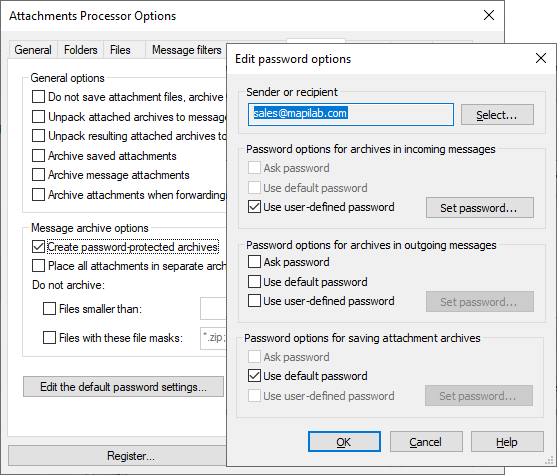
Automatic, password-protected archiving of sent attachments and automatic retrieval for the recipient makes unauthorized access to data impossible if, for instance, a message with an attachment is sent to a wrong address.
Keep received attachments in the right way
You can catalog extracted and stored attached files in your file repository quickly and easily. The product allows you to set the name format of the storage folder and/or the file, and that name format will be automatically used when saving files. For example, "Invoices" -> "September" -> "Invoice from supplier AAA.pdf" - is a clear and concise naming pattern.
Take a look inside Attachments Processor for Outlook
Working mode to process Outlook attachments
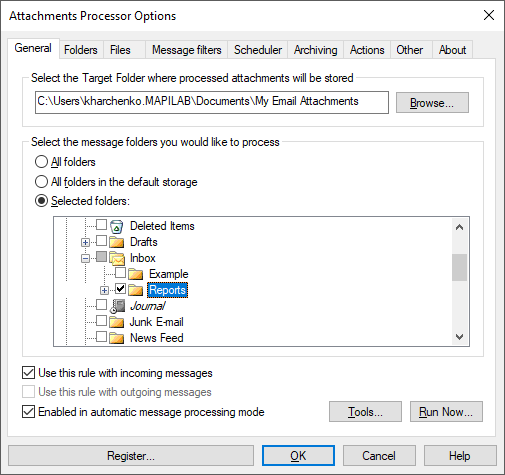
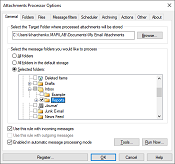
Attachments Processor allows you to select which folders to monitor and where attachments should be processed. You can also select one of three modes of operation: automatic processing of the attachments; start by scheduler; and start by request (manual processing mode). With the help of the scheduler, you can process messages even in Microsoft Exchange Public Folders.
Multi-rule operation with Outlook attachments
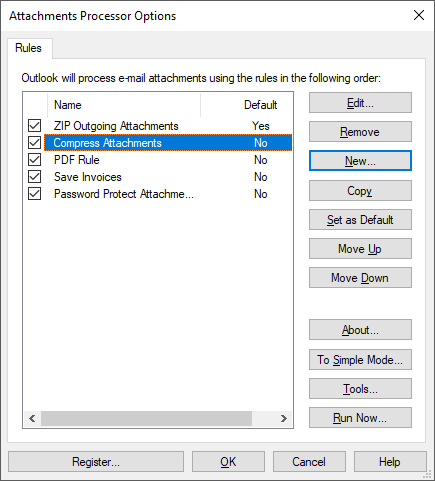
Attachments Processor can be used in Simple Mode where one only rule to process attachments is used; or in Advanced Mode where the number of rules is unlimited. A separate rule can be configured for each message folder, for different types of attachments, or for different message senders; etc.
Flexible filters
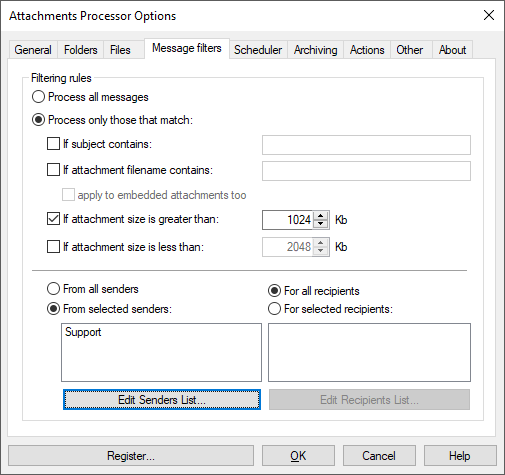
With the help of filters, you can configure the product to process only the attachments that require processing. For example, process large files only or attachments of messages with a specific subject. A combination of filters can also be used. For example, the product can process only messages received from a specified sender, with a specified subject and having a file name containing a specified text.
Post-processing actions
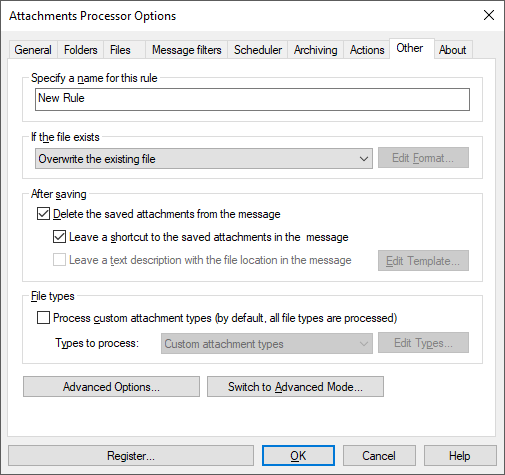
As soon as an Outlook attachment is saved in a specified folder, the product can delete it from the message or replace it with a shortcut to the saved file or a text file where the path and file name of the stored attachment are specified. This option prevents losing saved files in the various folders on your local drive or file store.
More tools and utilities for Outlook attachments processing
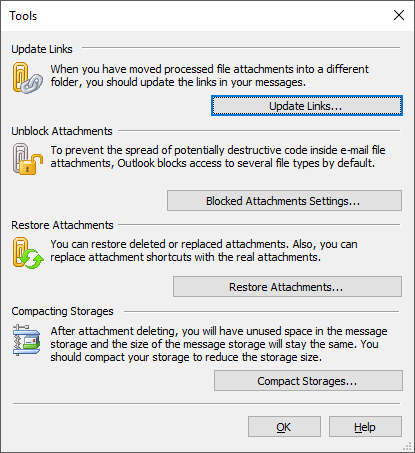
Attachments Processor contains 4 useful tools and utilities. They allow you to manage attachments blocked by Outlook security system blocks in Outlook; restore attachments processed by Attachments Processor; update the shortcuts in case of change of the location of stored attachments and there is a tool to compress Outlook PST files.
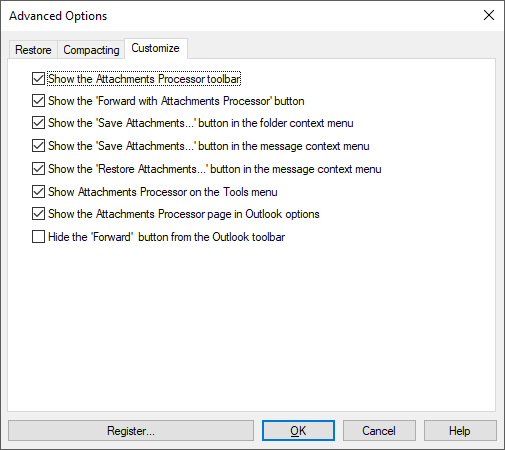
The appearance of Attachments Processor for Outlook can be adjusted using the product settings. You can even hide all the product buttons and options in the Outlook ribbon and allow the product to operate just in background mode.
Complete list of the Attachments Processor features
extracting attachments from the incoming messages, saving them on a disk and replacing the attachment with a link or text file with a description; packing attachments in the outgoing messages in ZIP format (self-extracting archives and password-protected archives are supported);
packing incoming and outgoing attachments (all attachments or only specific types of attachments);
automatic mode for unpacking incoming messages (please, use this feature cautiously because of the virus danger);
possibility of complete recovery of deleted by the program attachments;
automatic attaching the files in the forwarded and sent messages;
automatic and manual processing of all or only specified messages and folders;
processing all or only specific types of files;
large-scale capability of renaming files while saving;
deleting attachments from messages;
possibility of creating several message-processing rules in Advanced mode;
utility for managing attachments blocked by Microsoft Outlook Security System;
utility for automatic update the links to saved files in the messages;
automatic processing of the incoming messages according to the schedule;
automatic deleting the saved attachments after the message is permanently deleted;
compacting message storage after the deleting of attachments, including scheduled packing;
possibility of processing both incoming and outgoing mail;
possibility of creating file archives of attachments.
User Reviews
The Attachments Processor app looks really good. Can't wait to try it out!
How to send GDPR-compliant attachments in Outlook 2016 As European companies and their partners all over the globe are preparing for the introduction of the GDPR – a new set of personal data protection laws – learn how to ensure the compliance of your business correspondence... >>
Process e-mail attachments as safely as we can! The main efficient feature of the Attachments Processor for Outlook add-in is replacing attached files in the messages with the shortcuts. This procedure allows reducing mailbox size - and therefore... >>
Question: None of my rules grabs attched files from incomming messages and saves them to disk? Any idea on what could be wrong?
Answer:
Please check your attachments processor add-in rule settings under the "General" tab: the rule should be specified either for incoming, or for outgoing messages - this setting is critical, and the rule will not work without it. Under the "General" tab, you can also specify all folders you need to be processed. Please note: messages in the "Sent Items" will be also processed with the rule set for "Incoming messages". To process your messages in "Outbox" - you will need to create a separate rule (switch the add-in to the Advanced mode) for outgoing messages.
With the default rule settings, Attachment Processor doesn't change messages. It only saves (copies) attachments to disk (%User%\Documents\My Email Attachments). If you'd like to replace attached files - either with shortcuts (.lnk files), or with the text description (.txt files) - please configure that in the add-in settings: activate attachments deletion and choose one of these actions under the "Other" tab of the add-in rule settings. After enabling this option, the add-in will start replacing attachments with links, or text descriptions.
Question: Is it possible to set up a rule on Attachments Processor for Outlook to replace all mailbox attachments with links that are attached to messages which are say one year old or more? This would be very useful in being able to have direct & ready access to recent files attached to emails whilst still being able to access older email attachments by clicking on the links?
Answer: Yes, it is possible. If you'd like to process attachments in outlook messages based on receiving date - you could involve regular Outlook Search Folders feature into this process: since AP supports working with the Search folders, you can configure filtering by date in that search folder, and after that, specify in the AP rule only that folder - so AP will only process messages which are filtered into that "folder" (you most probably know that in "Search Folders", messages are merely displayed - but they are kept in their "original" Outlook folders).
Question: We are in the process of migrating our in house email to a hosted platform. We have used the attachments processor inconsistently for the past several years and we now need to recover the attachments that have been removed from email back into the information store prior to migrating the email. What do I need to do to the attachments processor to recover previously stripped attachments?
Answer: Please note some detail: shortcuts in your messages are attached .lnk files. If you save any of those .lnk attachments to disk - you will be able to see in the Properties of that link (it looks like and is the regular Windows shortcut) the path to the file. So, you could perform further operations with your messages and detached files taking into account this information (i.e. that the shortcut is valid if the path to the file is valid in its properties). After moving detached files to the new directory, you can run the option "Update links" to update links to these files in the messages. This option is available in the menu "Tools" under the "General" tab of the Attachments Processor Options. And after correcting paths (if neccessary) - to restore your extracted files back to messages - use the option "Restore Attachments deleted by AP".
Attachment Processor is the most powerful and multifunctional addon for Microsoft Outlook for managing of attached files.
THREE-IN-ONE solution
This addon for Microsoft Outlook includes the functionality of three products:
Attachments Processor: allows extracting attachments from the incoming messages and save them to your hard disk (extracted attachments are replaced in the incoming message with a link to the file on the disk or a text file with an attachment description as well and a link to it); Learn more…
Attachments Zip Compressor: allows automatic archiving the attached files by ZIP both for incoming and outgoing messages. It can create self-extracting archives and password-protected archives. Learn more…
Blocked Attachments management: utility for managing the list of attachment types, which are blocked by the Outlook security system (only for Internet Mail). Learn more…
Attachment Processor is an add-in for Microsoft Outlook. To remove, save or block attachments in Microsoft Exchange, please try another MAPILab software title for Outlook — Attachment Save for Exchange.
Attachments Processor for Outlook is fully compatible with:
Outlook for Microsoft 365/Office 365 in Windows;
Microsoft Outlook 2019, 2016, 2013, 2010, 2007, 2003, 2002/XP;
Microsoft Windows 11, 10, 8, 7, Vista, 2003, XP.
Why should the attached files be processed in the Microsoft Outlook messages?
To save space in the mail base (PST-file) or in the server store on Microsoft Exchange;
To have the files stored on the protected file server instead of regular message base;
To share the attachments with coworkers;
To protect the files using password-protected archives;
To do not borrow the partners by sending the files which will be blocked by Outlook Security System;
To be sure that the sent files will be reached unchanged;
For easy search the files and data stored there;
To do not take in mind which files should be packed (because huge) and which do not;
To protect from receiving the files which would be blocked by Outlook Security;
To do not have a deal with received ZIP files (unzip it automatically).
Attachments Processor is one of Outlook add-ins that works both with Microsoft Exchange server and Internet Mail (POP3). Unsecured attachments blocked by the Microsoft Outlook security system can be saved on the hard drive and also there is a utility to manage the list of attachment types, which are blocked by the Outlook security system (only for Internet Mail). The program works both in manual and automatic modes.
Saving your time seems to be a valuable achievement both for companies and internet users. Handling with your email you can spend hours arranging your messages and attachments. Currently, you're lucky to benefit from the best solution we provide.
Attachment Processor is an innovative addon for Microsoft Outlook ideal for managing of attached files. As you see this program has a lot of advantages in comparison with other utilities. Using it you can easily extract and remove email attachments saving your time and efforts. Operating automatically Attachment Processor program is dedicated to dealing with specific tasks on emails. Due to multiple functions of Outlook attachment extractor, you can extract and remove all attachments to disk and copy emails to other Outlook folders. Helping you to extract and share the attachments with coworkers Attachment Processor has been an essential program for office employees. Optimize your email work and let it be done automatically.
Download Trial Version
You can download free trial version (9883 KB) of Attachments Processor for Outlook and test it before purchasing:
How to send GDPR-compliant attachments in Outlook 2016 As European companies and their partners all over the globe are preparing for the introduction of the GDPR – a new set of personal data protection laws – learn how to ensure the compliance of your business correspondence...
Process e-mail attachments as safely as we can! The main efficient feature of the Attachments Processor for Outlook add-in is replacing attached files in the messages with the shortcuts. This procedure allows reducing mailbox size - and therefore...
How to unblock attachment blocked in Outlook Fed up with receiving files, but being unable to open them from Outlook? We have a few ideas that you might find handy. Although you can’t change attachment blocking settings in Outlook...
Five reasons to save Outlook email attachments on a separate storage Do you often exchange documents and images with your customers or partners? Do you send bulky files to your colleagues for reviewing and reporting? In other words, does your mail flow contain a lot of attached...
Duplicated attachments in Outlook: How to avoid? The mail flow in a company often contains a lot of email duplicates: messages from external and internal senders are forwarded to colleagues, bosses and relevant departments. When you receive a letter and realize...
The Website uses cookies that allow us to recognize you and collect information about your user experience.
Permission to use cookies necessary for the use of the Site and its services, including ordering services. By visiting the site, we are sure that you consent to the use and storage of cookies on your device. If you agree, continue to use the site. If not – set special settings in your browser or contact technical support.






 Need to manage email attachments directly on Microsoft Exchange Server?


 User Reviews





 Primary Download


 Product Home Page