Reminders Assistant
This Outlook add-in enhances the functionality of the standard reminder system of Microsoft Outlook and gives you a possibility to set reminders for each and every folder including embedded ones.
The reminder processing system in Microsoft Outlook allows setting reminders only for the elements that are located in one of four folders: Inbox, Calendar, Tasks, and Contacts. If the element is in other folders or subfolders, you will not be able to see the reminder for it. But with the help of this Outlook add-in, you can select folders and subfolders containing elements for which you don’t want to miss reminders.
 
Example of component use
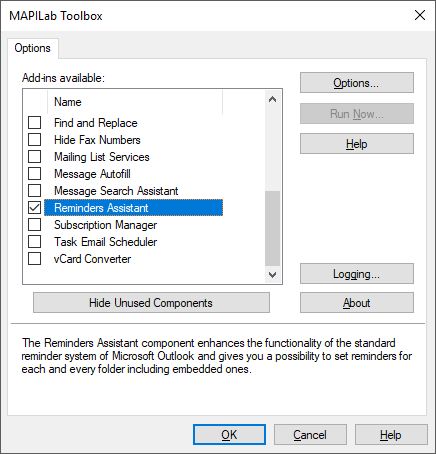
First of all you should make sure that the Reminders Assistant component is enabled in the settings of MAPILab Toolbox:
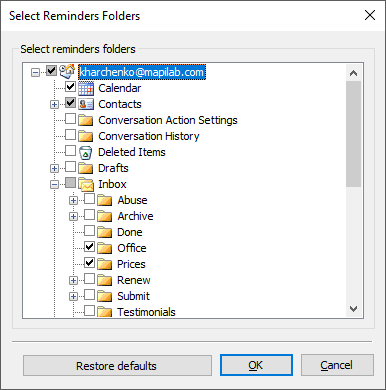
In the component setting window (Tools --> MAPILab Toolbox --> Reminders Assistant) you can select the folders containing elements which the reminders are going to be shown for. Only four folders are checked by default. You can add any other folders to this list and in such way, we will never ever miss reminders set for the elements in these folders:
The Reminders Assistant component is one of the 20 addins included into the program MAPILab Toolbox. You can learn more about other Outlook addins and download the trial version at the MAPILab Toolbox product page.
Click here to find detailed information about licenses and purchase the full version of MAPILab Toolbox. |
|
|
 |
|
|
|
 |
 |
 |
 |
 |
Purchase MAPILab Toolbox online through a secure server with any major credit cards. |
|
 |
 |
 |
 |
|
|
|
|
|
|
|
|
|
|
 |
|
|
|
|
When you consider the value of your own time and just how much of it would be required to accomplish all that MAPILab's tools can perform in a tiny fraction of it, the decision to purchase is a "no brainer". I'm still discovering ways to be even more organized, allowing me to put my time to better use. Nice job folks!
Robert Leety
Horberg Industries, Inc.
 Leave your testimonial Leave your testimonial
|
|
|
 |
|
 |
|
|
|
|
|
|
Related posts in company's blog
How to select Outlook account for messages automatically
Managing two Outlook accounts at the same time can be tricky – especially, if you need to be careful about what account you send new messages from. Thanks to Message Autofill...
How to schedule recurring emails in Outlook 2013
One easy method of sending recurring email messages is via the Email Scheduler and Task Email Scheduler add-ins for Outlook. Both add-ins are very similar in principle...
How to add BCC recipient automatically in Outlook 2013
When you send specific message through Outlook, you may need to send a blind copy to a person, just to let him know the case. That is easy if you send a single message. But sometimes...
How to send Outlook emails by schedule
It is a well-known fact that people find it easier to make a promise than to keep one, but when it comes to business commitments, there are no pretexts good enough to break those...
Sending Outlook emails after approval only
A new face in the company is not just ‘fresh blood’, ambition-driven diligence, and some new jokes at lunchtime. A new employee is also a great deal of responsibility ...
View more posts
|
|
|








 Primary Download