



What's new in Print Tools for Outlook?
Version 2.0 - released on August 24, 2022
- Compatibility with Microsoft Office 2021 and Windows 11 is added.
- Add-in performance is significantly optimized and accelerated for loading in Outlook and accomplishing printing tasks.
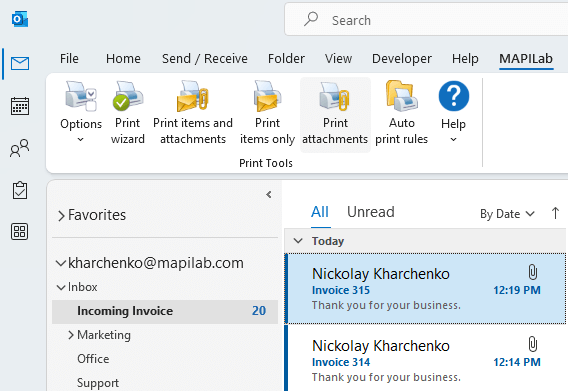
- Add-in interface updates: auto-printing setting is moved to the ribbon, etc.
- Compatibility with the latest Microsoft security updates for Office 365 is added.
- Licensing model of the product is changed: starting from version 2.0, the subscription-based licensing is applied.
Version 1.10 - released on July 19, 2019
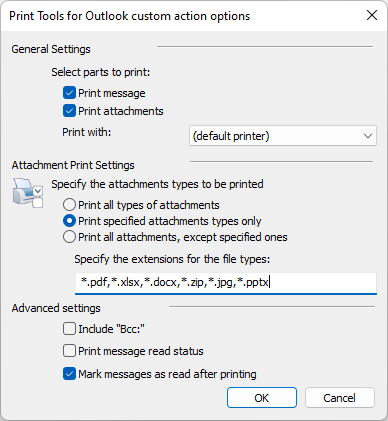
- New: the possibility to mark messages as read after printing them is added.
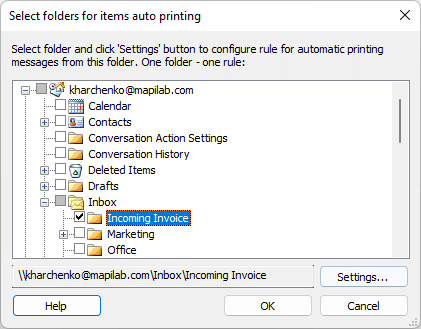
- New: IMAP and Search folders can now be used for automatic printing messages and attachments.
- Fixed: in separate rules for auto printing, issues with saving advanced settings are resolved, i.e. printing BCC field in outgoing messaged and printing read status.
- Inserting extra objects into the print-out (attachment list, BCC field, read status) is improved.
Version 1.9.3.8 - released on June 21, 2018
Fixed: the scaling issue in the add-in dialogue windows was known with the customized Windows Display Settings where the size of text and other items was over 125%.
Version 1.9.3 - released on November 30, 2017
- Fixed issue with saving filter settings for the file types selected in the rule is fixed; it was known in the systems with limited current user permissions.
- Fixed error with localization of the name of the default system printer.
- Fixed issue with possible printout duplicating if Outlook rules for copying messages to other folders are used.
- The mechanism of printing Microsoft Word documents attached to the messages is improved: this improvement allows to prevent probable pending of the Microsoft Word process if numerous large documents are sent to the printer and to prevent missing files in the print queue as well.
- Optimization: the algorithm of preparation of data before sending it to the print queue is improved, and processing large print tasks is accelerated that way.
Version 1.9.2.9 - released on July 10, 2017
- An issue with the error code 0x800A0E78 on Outlook start-up is fixed; it was known in several cases with non-English operation systems, i.e. German versions of Windows 7-10.
- An issue with starting Microsoft Outlook in the limited functionality mode with the Print Tools add-in installed, is fixed; Outlook e-mail client may start in this mode if the Mail Merge feature is used in Microsoft Office, or if the "Send to Mail recipient" function is selected from the file context menu in Windows Explorer, or in another 3rd-party application.
- Fixed: an installation issue is resolved, for the computer users with limited permissions (i.e. Standard Users), the issue previously prevented the add-in from appearing in the limited user's Outlook toolbars.
- Correction for the User Notification System about the license status for the 32-bit versions of Microsoft Outlook.
Version 1.9.2.3 - released on 10 February, 2017
An update for the mechanism for prevention of a system security warning from Outlook when trying to access items has been implemented. This warning appeared in systems of some languages after installation of Outlook 2016.
Version 1.9.2 - released on 5 July, 2016
- New: the following archive types are now supported: .7z, .gz, .bz2, .tar, .cab, .iso. The previous versions supported .zip and .rar only.
- New: the Read/Unread status of the message can be printed now.
- New: the “Export to PDF” option is added: the message can be converted to the PDF file and saved into the specified location.
- Fixed: the issue with processing compressed directories and folder trees within the attached archives is resolved.
Version 1.9 - released on 4 February, 2016
Support for Microsoft Outlook 2016 has been added.
Version 1.8.2 - released on 27 March, 2014
- Compatibility with Microsoft Office 2013 Service Pack 1 is added.
- Support for automatic printing in Outlook is added; that alternative method enables auto printing without using regular Outlook rules.
Version 1.8.1 - released on 28 November, 2012
Support for Microsoft Outlook 2013 and Windows 8 has been added.
Version 1.8 - released on 02 August, 2011
A possibility to print PDF attachments by using alternate method of printing has been added.
Version 1.7.8 - released on 12 February, 2010
Support for Windows 7 and Microsoft Office 2010 Beta has been added.
Version 1.7.6 - released on 12 December, 2006
Support for Windows Vista and Microsoft Office 2007 has been added.
Version 1.7.5 - released on 20 November, 2006
- The error of printing a big number of files has been fixed.
- The error of printing messages in html format with embedded images in Outlook 2003 has been fixed.
- Support for Windows Vista RC2 has been added.
Version 1.7.4 - released on October 30, 2006
The add-in is fully compatible with Microsoft Office Outlook 2007 (Beta 2 TR).
Version 1.7.3 - released on April 14, 2006
- Program Install Wizard has been improved.
- The "Help" section has been enhanced.
- The list of company's products and their description has been updated.
Version 1.7.2 - released on January 19, 2006
New feature has been added: now it is possible to select a printer to print the attachments automatically.
Version 1.7.1 - released on December 30, 2005
German language interface has been added.
Version 1.6 - released on June 8, 2005
TIF image processing component has been improved.
Version 1.5 - released on May 6, 2005
BCC printing has been added.
Version 1.4 - released on February 9, 2005
Added compatibility for messages processed with the Attachments Processor.
Version 1.3 - released on November 5, 2004
Automatic recognition of paper orientation has been added.
Version 1.2 - released on September 23, 2004
Issue with the printing of PDF attachments has been fixed.
Version 1.1 - released on August 27, 2004
- Microsoft Windows XP Service Pack 2 compatibility issues have been fixed.
- Product was tested with Windows XP 64-bit Edition, no known issues.
- Product was tested with Windows XP and AMD Athlon 64, no known issues.
Version 1.0 - released on August 6, 2004
First public version.
 User Reviews




 Primary Download


 Product Home Page